

Cart
0
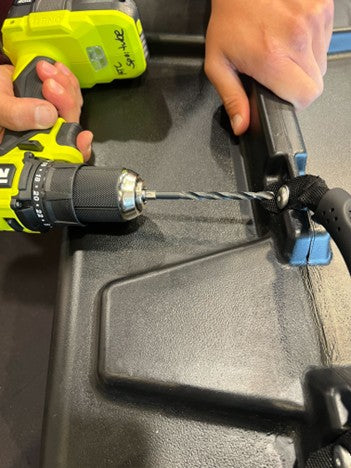
You will need a drill and a pop-rivet tool.

1. Drill the existing rivet out using a drill small enough to not enlarge the existing hole or otherwise remove any plastic material. Make sure the rivet does not spin when drilling. If it does, hold it tight with a pair of pliers.

2. Align the grommets of the replacement handle with the existing holes of the Series 3.

3. There are four holes in each area where the Series 3 replacement handles can be mounted. It does not matter which set is used; these holes were originally intended to allow for optional shoulder-strap carry or affixing Hitchin' Technology items.

4. The replacement handle has four grommeted flaps. In the proper position for installation, a grommet will be visible on either side of the case.

5. The rivets used to install the replacement handle are two-piece, one male and one female. It does not matter which side each is installed on, as long as there is a grommet visible on both sides.

6. The photo below shows the proper position of rivet and handle. Note: a grommet is visible on both sides. The protruding mandrel on the left is how the rivet tool fastens the halves together.

7. Using the rivet tool and ensuring a tight fit of rivet parts and handle, fasten the halves of the rivet and the installation is complete. Your Series 3 is ready for the next adventure.


